
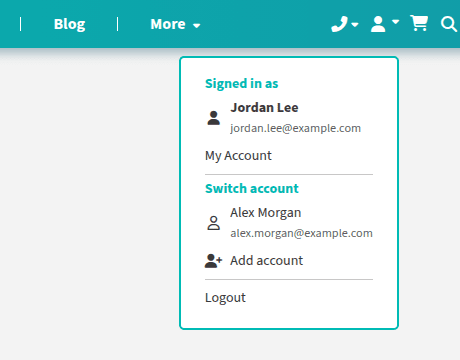
If you manage orders for more than one team — or keep separate work and personal accounts — you don’t have to log out and back in to move between them. Every account you log in to on this browser is remembered in your account menu.
Switching accounts
- Click the account icon at the top right of the page. The account you’re using is listed under “Signed in as”.
- Under “Switch account”, click the account you’d like to use.
The page reloads and you’re working as that account — carts, quotes, and orders all belong to whichever account you’re using.
Adding another account
Choose “Add account” from the same menu and log in as you normally would. Both logins are now saved, and you can swap between them in one click.
A few things to know:
- Saved accounts are remembered on the browser you used to log in — a different computer or phone starts with its own list.
- “Logout” signs out and removes only the current account from the saved list; the others stay put.
- If a saved login has expired, it drops off the list when you try to switch to it — just log in again from “Add account” to re-save it.